Your Coding Agent Should Never Hold a Token: Riptides Approach to Credential Brokering,
Introduction
These days a lot of software development is AI-assisted: you describe what you want, and a coding agent goes off and does it: reads the repo, runs the tests, opens the PR.
But agents don’t work in a vacuum. Sooner or later the agent, or one of the tools or MCP servers it’s allowed to use, needs a credential to do its job. Your job, really. And that’s the point where the comfortable feeling stops or where it should stop. Can you trust your agents?
The answer is that this isn’t only a question of trust. Set aside for a moment how LLM providers handle your credentials: an agent isn’t a piece of code you wrote and reviewed. It’s a process whose next action is decided by an LLM reacting to whatever text has landed in its context. And that text can be anything: a README, a docstring, an MCP server’s reply, an issue body written by a stranger. Any of it can carry an instruction, and telling a legitimate action apart from an attempt to steal something is genuinely hard. The exposure is real and it’s broad: prompt injection that turns a .env read into an exfil, supply-chain packages that specifically hunt for AI CLI config files, misconfigured base URLs that ship your API key to somebody else’s host, tokens that stay valid for weeks after they leak. Every one of those attacks needs the same precondition: a credential the agent can reach.
These are threats developers hit day after day, which is why Riptides built a platform to close the gap. This post walks through the problem with a real but simple example, and shows how Riptides solves what the industry calls credential brokering - across your dev machines and your production environments.
An everyday use-case
Here’s a task about as mundane as it gets: fix a GitHub issue.
Hi Claude! Solve this issue: https://github.com/riptideslabs/taskflow/issues/1Without any credential infrastructure, this is how far the agent gets:
$ gh issue view 1 --repo riptideslabs/taskflow --json title,body,number,comments,labels,state
To get started with GitHub CLI, please run:  gh auth login
Alternatively, populate the GH_TOKEN environment variable with a GitHub API
authentication token.
The agent stops and asks you to authenticate. And here’s the moment nobody thinks twice about: you run gh auth login, or you paste your personal access token into GH_TOKEN, and now a long-lived GitHub token with access to your repos is sitting in the environment of a process that will happily run env, cat, or curl because an LLM told it to.
You didn’t do anything wrong. You did the normal thing. That’s the problem.
How does Riptides solve this problem?
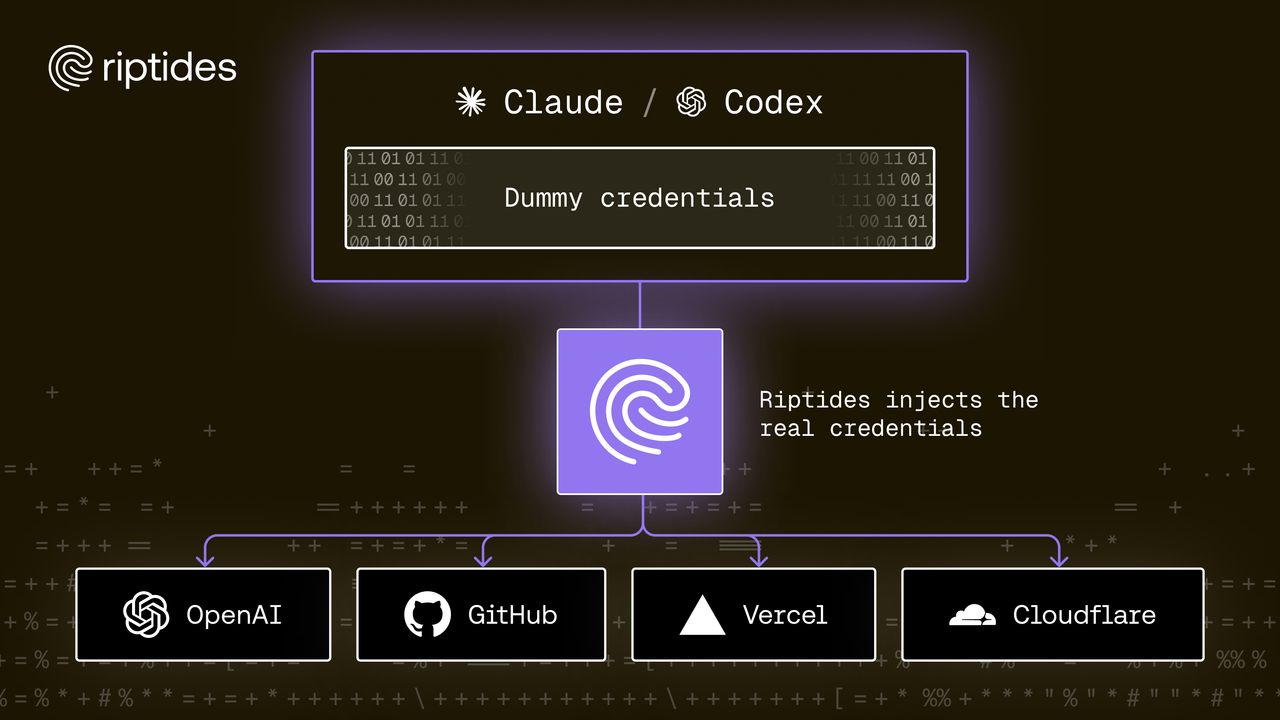
Riptides is a security platform that injects credentials directly on the wire.
The agent sends its request with a placeholder, or with no auth at all. On the way out, before the packets leave the machine, Riptides swaps in the real credential. The application sees the placeholder. The API sees a valid token. Nothing in between ever writes the real secret to a file, an environment variable, or the agent’s memory.
Setting that up is three declarations:
1. Who is this? You define a workload identity using a selector. A selector can be almost anything: process name, container image, Kubernetes labels and namespace, cloud instance metadata. Riptides collects these itself, from below the application, so a process can’t claim to be something it isn’t.
2. What’s the credential? You define where the secret comes from, once: a static API key, a secret in Vault, a secret provided by Azure or GCP token exchange. One definition, reusable everywhere.
3. Who may use it, and where? You bind the two together and name the destination. This identity gets this credential, on requests to GitHub but only for GitHub.
That’s the whole model. From there on it’s automatic, and nothing in your setup had to change: Claude Code is the stock binary, gh is the stock binary, no SDK, no wrapper, no HTTPS_PROXY, no custom CA in the trust store, no agent-framework plugin.
Let’s see how it works in practice.
Step by step guide
Five steps. Nothing in them touches the agent, the shell, or the project.
1. Get a control plane
Request a workspace at riptides.io/get-started. You’ll get a console URL of the form https://<yourorg>.console.riptides.io. It’s hosted by Riptides so you don’t need to deploy or maintain.
2. Attach the machine where your agent runs
The agent here runs in a Linux VM, a separate environment from the host, under stricter control. To attach the machine, use a Join Token:
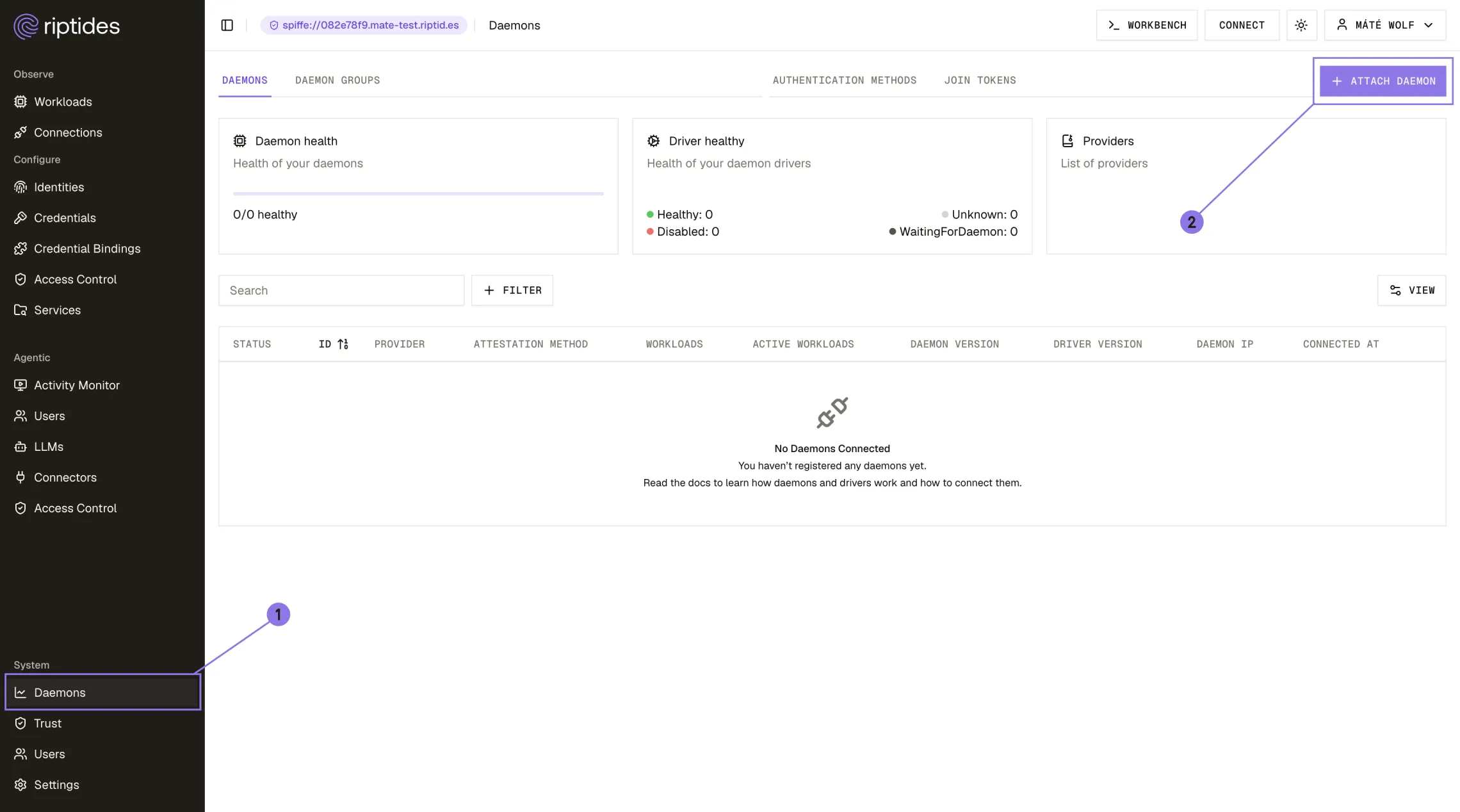
- Open your Riptides control plane
- Log in
- Click Daemons in the menu bar
- Click Attach Daemon
- Create a Join Token
- Run the command on your machine
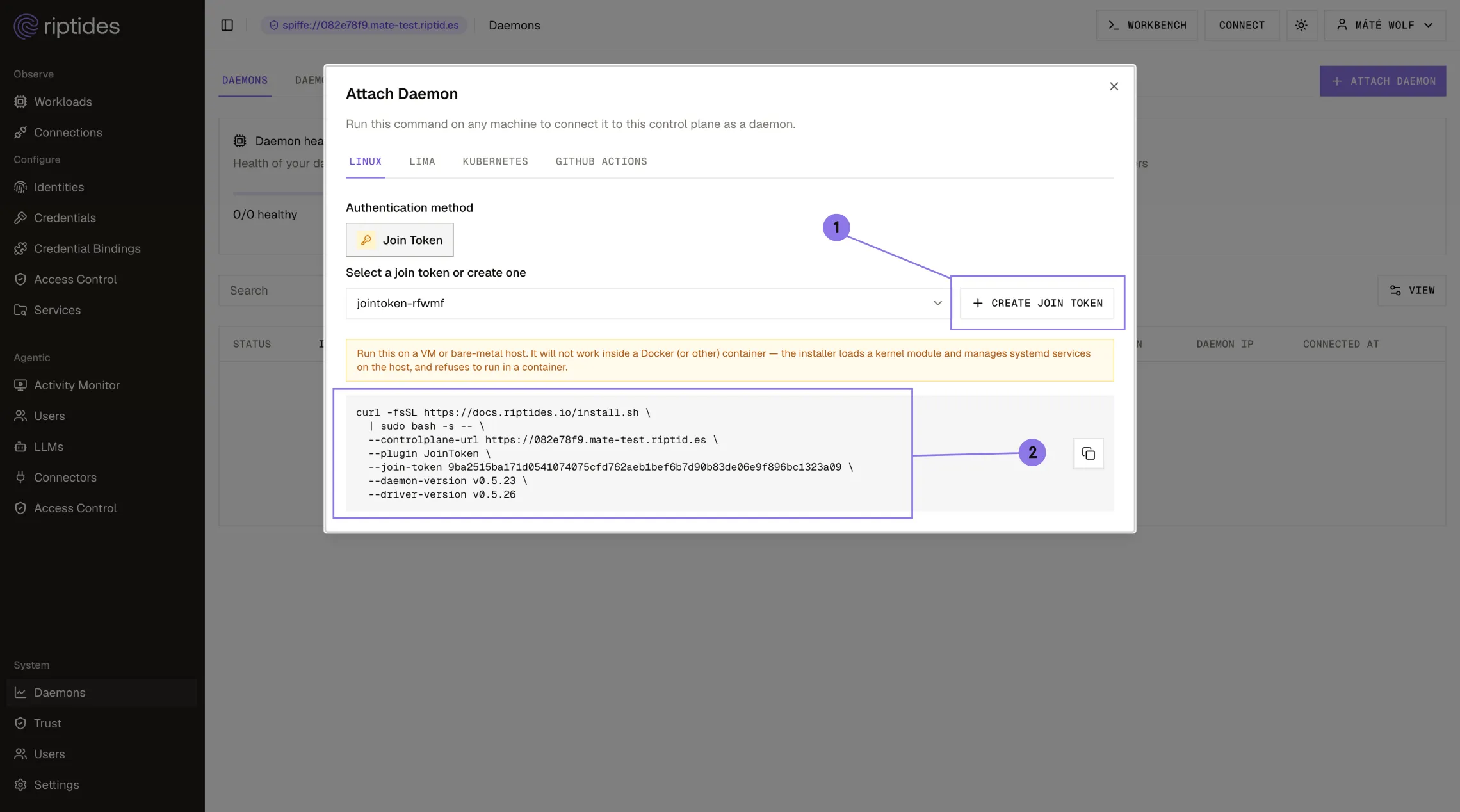
The same command works on a workstation, a CI runner, or a Kubernetes node.
Within seconds the node appears in the console and every workload on it is also scanned. Start a session and Claude Code shows up on its own.
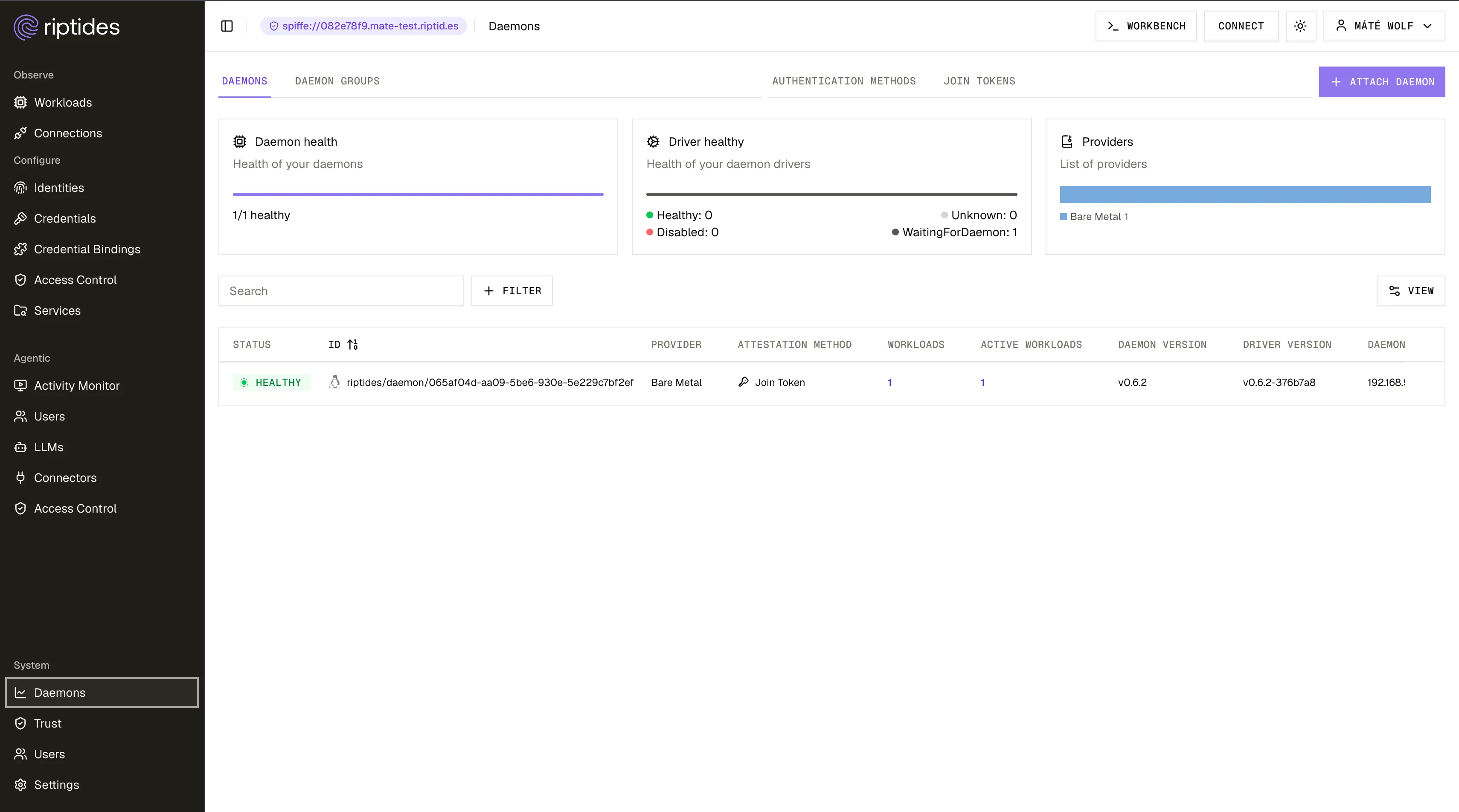
You’ve configured nothing yet, and you can already see what your agent is talking to.
3. Give the agent an identity
Open the Identities menu and click Create Identity. Restrict this identity to the machine by selecting its hostname, and name it devenv.The selector options come from what’s actually running, so you’re choosing from a list rather than guessing at strings.
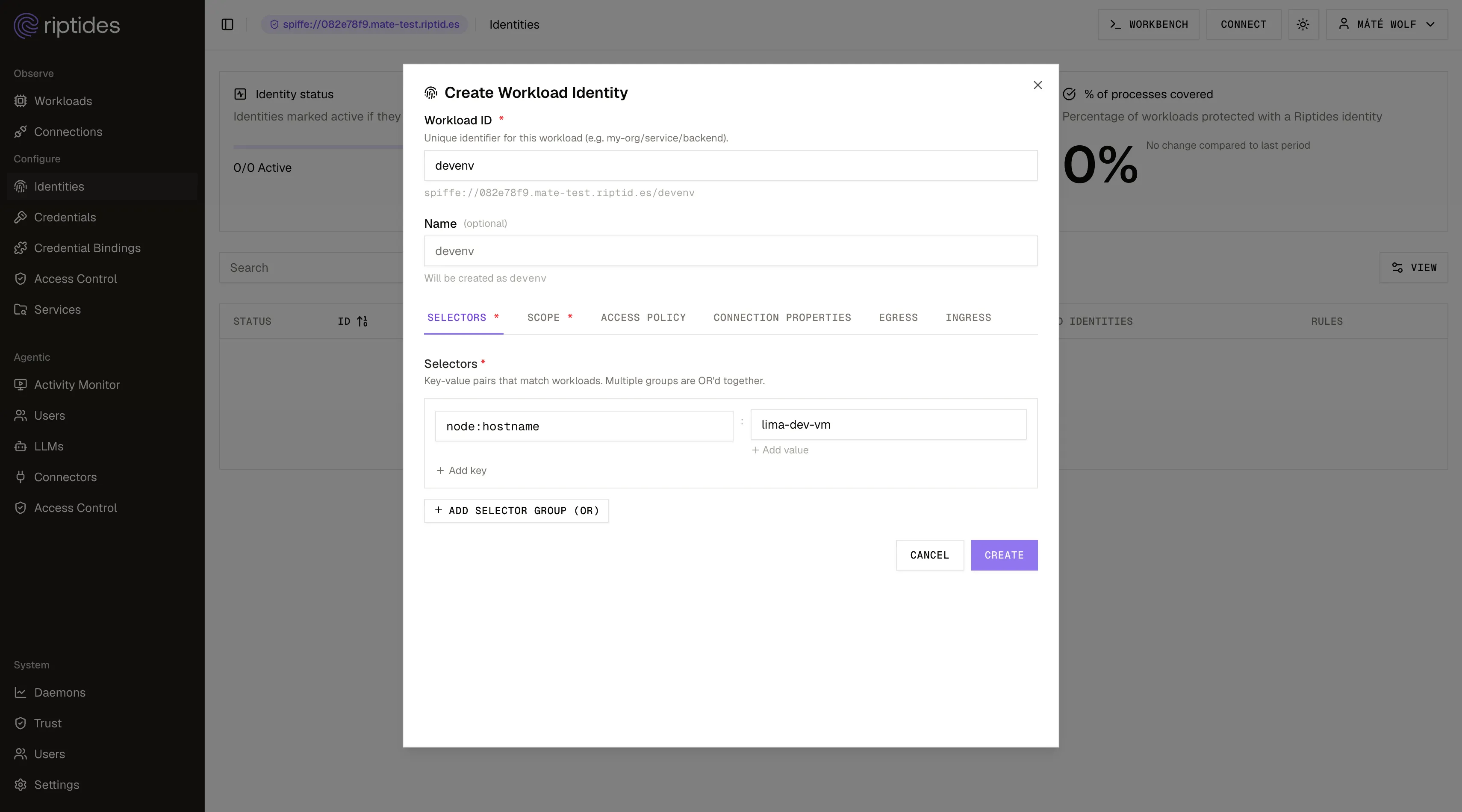
Every identity in Riptides has to be attached to a daemon or a daemon group. The daemon is the program running on your machine that talks to the Riptides control plane.
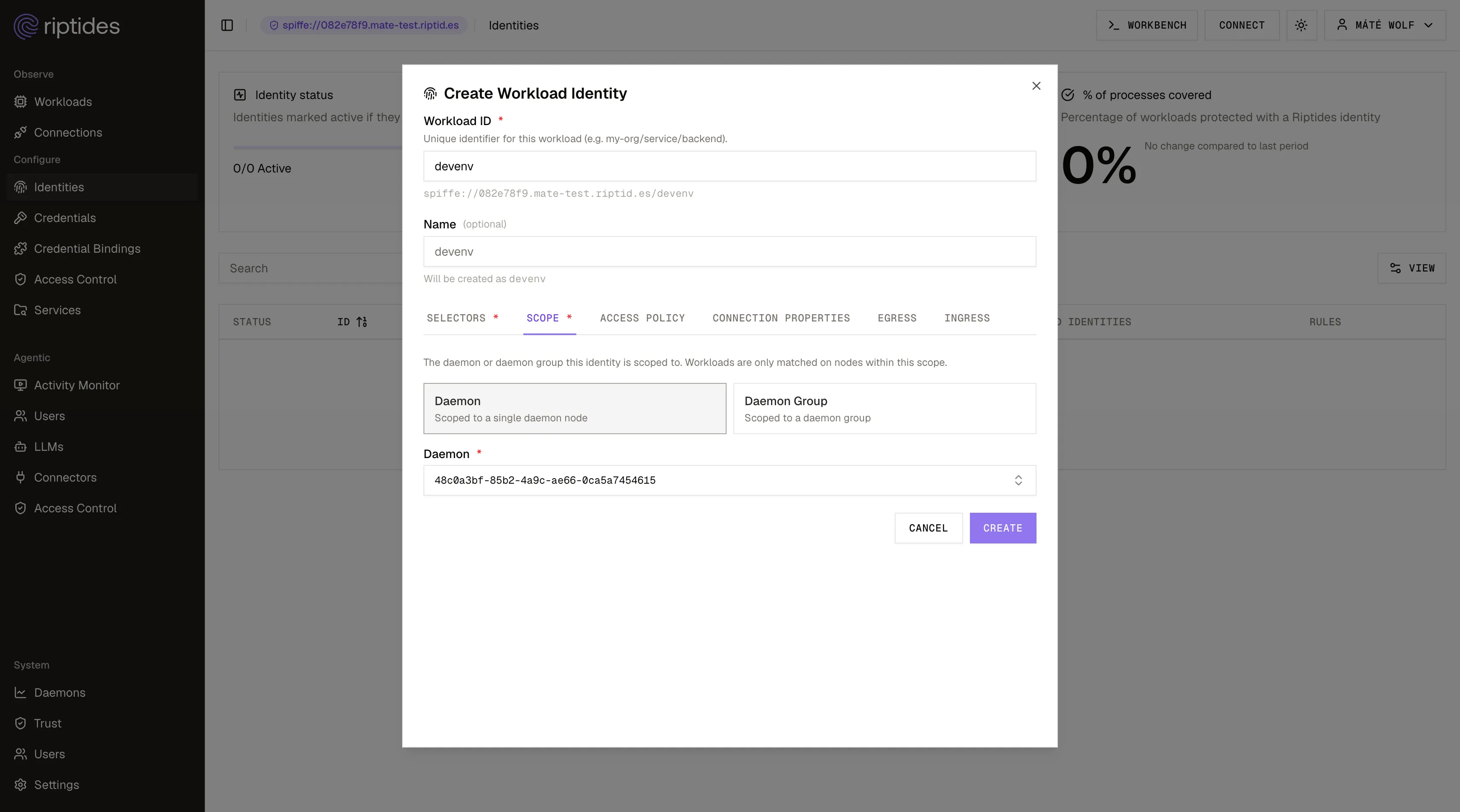
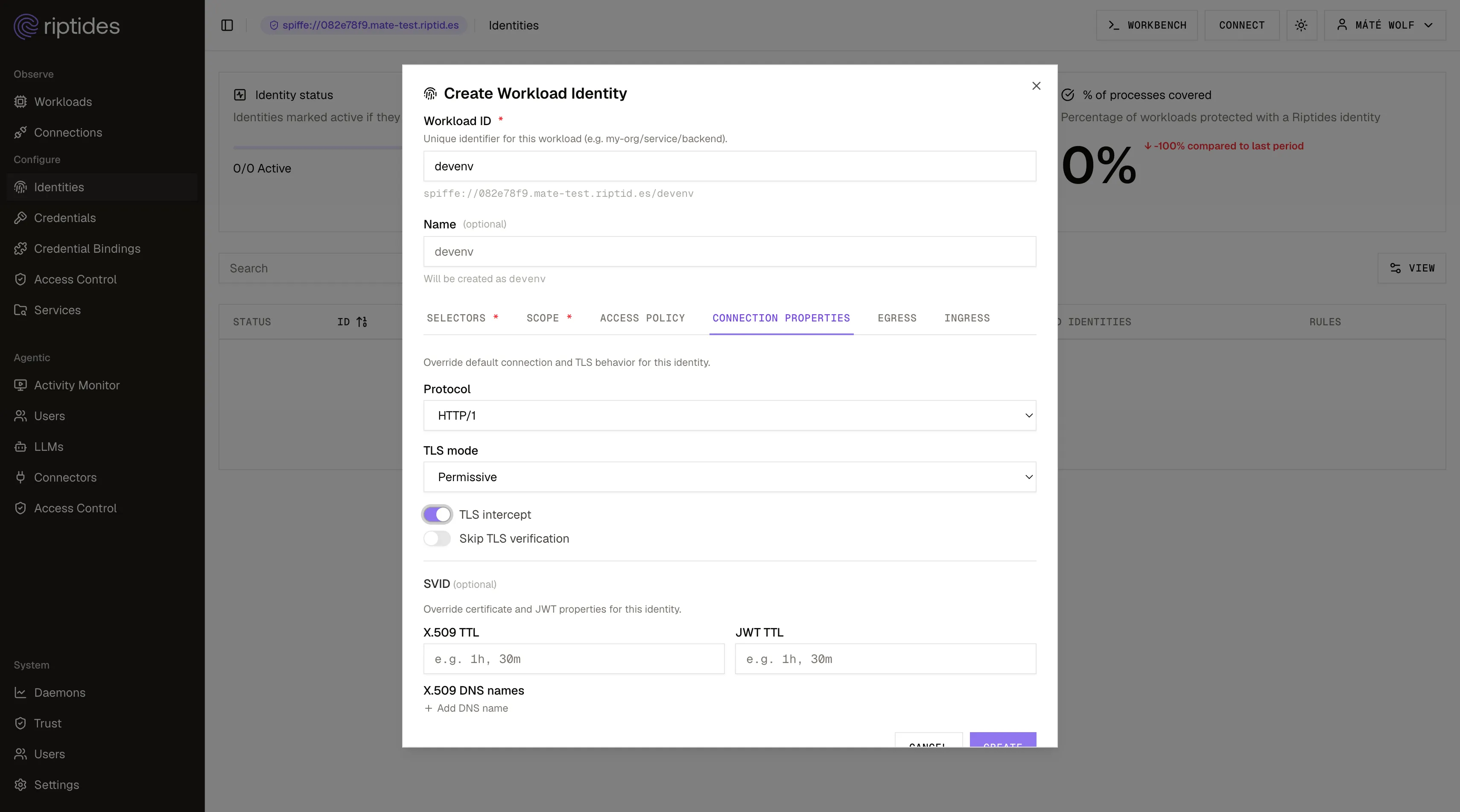
Credential injection has to write into an encrypted stream, so you need to allow TLS termination for this identity. You’ll find it on the Connection properties tab.
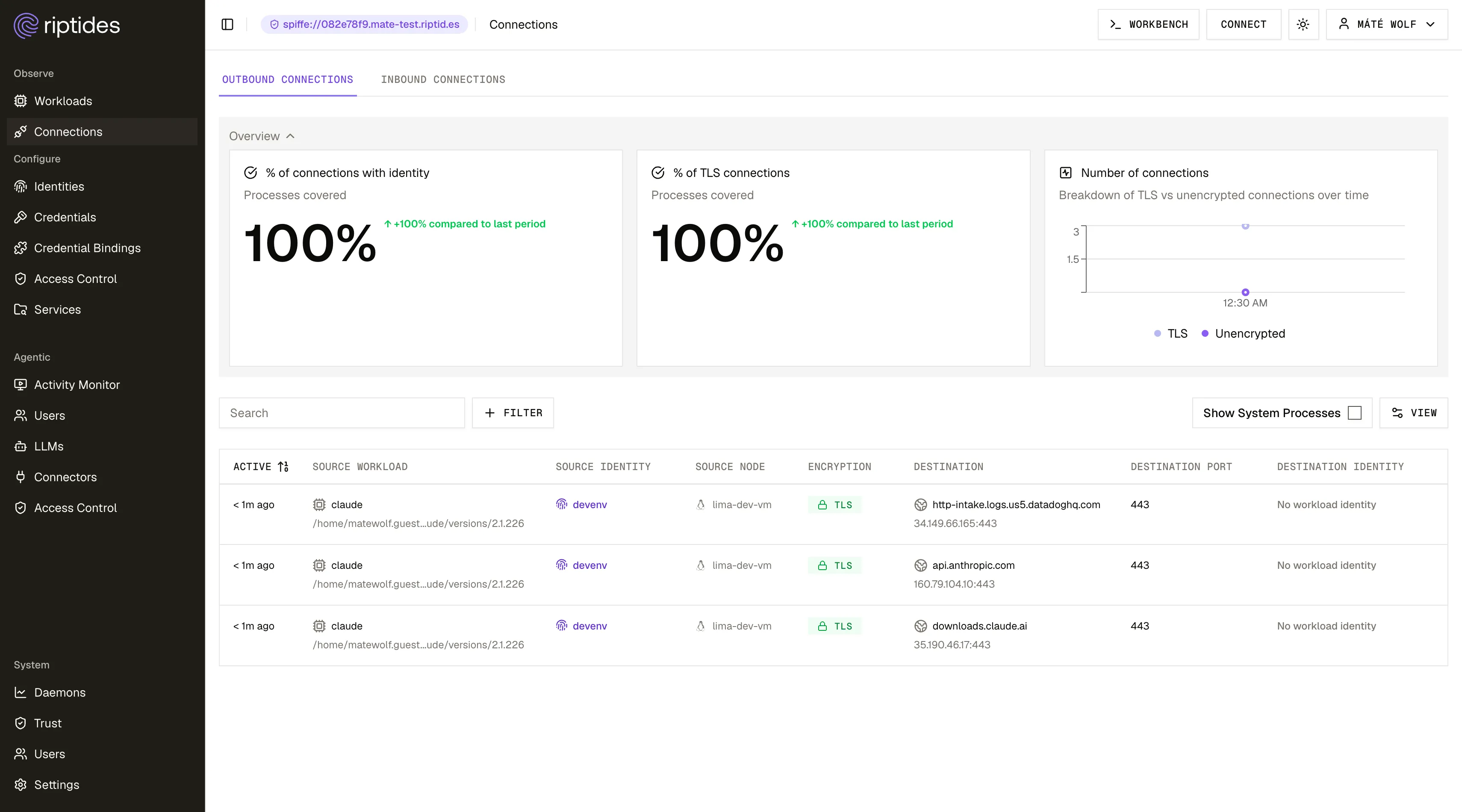
Restart claude and start a new session. It now runs as devenv.
4. Add the GitHub token
Under Credentials, click Add credential, choose a Static credential, and paste in a GitHub PAT scoped to what the agent actually needs.
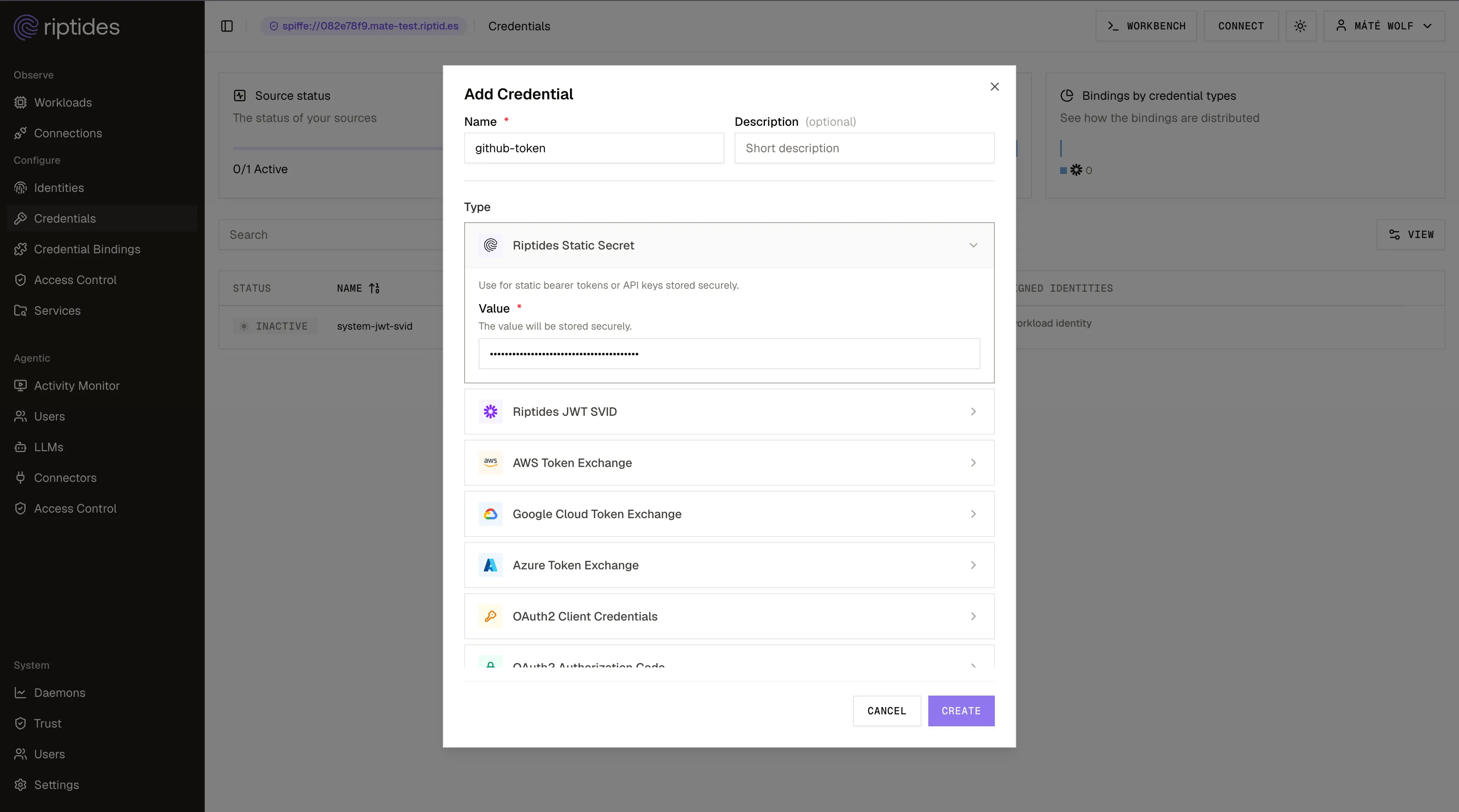
Still a long-lived PAT but now it lives in the control plane, bound to an identity and revocable in one click, instead of in a .env on a machine that a postinstall script can read. Swap it for Vault or a cloud token exchange later without touching anything else.
5. Bind the credential to the identity, in the direction of GitHub
Under Credential Bindings, click Create Binding and connect the two, then name the destination: identity devenv, credential github-token, destination GitHub.
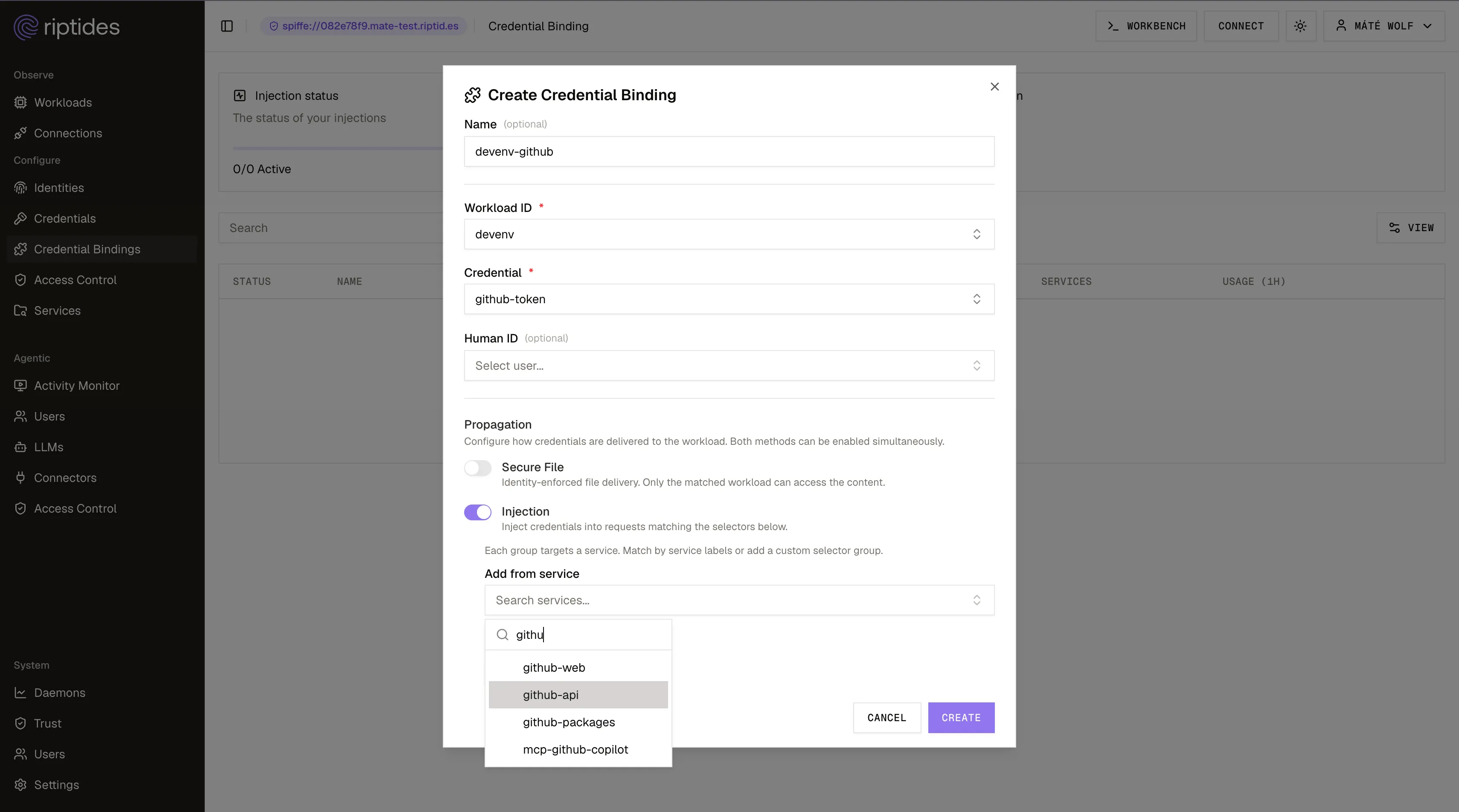
Read it out loud and it’s the whole model: this identity gets this credential, on requests to GitHub, and nowhere else. The agent can’t take the token elsewhere, because it doesn’t have the token.
Let’s watch it happen.
The same use-case, now with Riptides
The GitHub CLI still expects either an environment variable or a completed auth flow, so give it a dummy value. Let’s say peach.
$ export GH_TOKEN=peach
$ gh auth status
github.com
  ✓ Logged in to github.com account matewolf (GH_TOKEN)
  - Active account: true
And then the agent just… works:
- Title: Bug: Page 1 is missing tasks when paginating
- State: OPEN
- URL:   https://github.com/riptideslabs/taskflow/issues/1
- Body:
    ## Summary
    A client paging through `?page=1&limit=3` never sees the newest tasks,
    and the pages don't add up to `total`.
    ...
Full issue body, comments, labels. The GitHub API is perfectly happy. gh is perfectly happy.
The token is peach.
The real GitHub token never entered the agent’s environment, never touched the filesystem, and never appeared in the model’s context. If a prompt injection three turns from now convinces this agent to curl its environment variables to an attacker, the attacker gets a fruit.
Ok. But is the threat real? A quick credential leakage history class
The peach demo is cute, but the reason it matters is that the threat is real and current. There are enough documented cases by now to make the pattern obvious, and the shape is identical every single time: injected text convinces the agent to read a credential it can reach, then to send it somewhere it shouldn’t.
CVE-2025-55284 - Claude Code smuggles secrets out over DNS. A prompt injection hidden in a source file told the agent to read .env and encode the contents as a series of DNS lookups. The network commands it used (ping, nslookup and dig) were all on the auto-approved “read-only” list, so nothing ever prompted the developer. (Embrace the Red) Amazon Q Developer had the same flaw, patched quietly by AWS a few weeks later without a CVE at all.
CVE-2026-21852 - opening a repository was enough. A crafted settings file inside a project pointed Claude Code’s API endpoint at an attacker-controlled host. The agent honored the override and started making calls with the user’s Claude API key in the header. You didn’t have to run anything. You had to open the folder. (Check Point Research)
CVE-2026-21516 - Copilot reads its own environment out loud. Injected repository content convinced GitHub Copilot to pull GITHUB_TOKEN out of its own process environment and print it back through its normal output. No exotic exfiltration channel required. The token was sitting there because Codespaces had put it there, as designed.
IDEsaster - two dozen more, and one that needed no exfiltration at all. Researchers found 24+ CVEs across Cursor, Copilot, Windsurf and Zed. The standout: the agent writes .env contents into a JSON file whose schema URL points at the attacker’s domain, and the editor’s own validator dutifully fetches that URL, secrets in tow. The agent never “sent” anything. (The Hacker News)
Then there’s the case that should worry you most, because it’s the one where the agent stopped being the victim and became the weapon.
In August 2025, someone published malicious versions of nx carrying a post-install script that ran the moment anyone installed it. The script did the obvious thing first: swept the machine for SSH keys, npm and GitHub tokens, .env files and crypto wallets. Then it did something new. It looked for AI coding CLIs already installed on the box (claude, gemini, q) and invoked them with their permission prompts disabled, handing them a prompt that asked them to go find anything else sensitive on the filesystem. The developer’s own agent, with the developer’s own trust settings, did the scanning. Everything it found was base64-encoded and pushed to a new public repository in the victim’s own GitHub account.
The scale of it was staggering. GitGuardian counted 2,349 credentials taken from 1,079 machines, and more than a thousand of them were still valid when researchers went looking. The attackers used those to flip 10,767 private repositories public, exposing a further 82,901 secrets from codebases nobody had ever intended anyone to read. One compromised dependency, and a laptop full of agents willing to help. (GitGuardian)
That’s the “agent as application” threat model in one incident. The agent on your machine has shell access, elevated trust, and a credential in reach. Someone else’s postinstall script is enough to point it at you.
Scoping tokens narrowly helps. Short-lived tokens help. But both of those only shrink the blast radius of a leak. Only hiding the credential prevents the leak entirely.
Why Riptides is different
Plenty of companies are working on credential brokering. Almost all of them arrived at the same answer: put a proxy in front of the agent. Riptides didn’t.
No proxy means nothing to wire up. You never point an application at Riptides. No HTTPS_PROXY per process, no custom CA in every trust store, no parser for every protocol that isn’t HTTP. You define an identity once, and it works the same on a laptop, a CI runner, or a production cluster. You also avoid what a gateway inevitably becomes: one network-reachable service holding valid credentials for every workload it serves, where a single compromise hands over all of them at once.
A session is more than a connection. One agent task is a model conversation, an MCP call, a GitHub request and a database query - separate sockets, often separate processes. A proxy sees them arrive from the same IP and has to guess they belong together. Riptides stamps each one with the same session identity at the source, so the whole session can be traced and controlled as one thing rather than inferred after the fact. Riptides’ AI Audit feature builds on this and is now in beta.
And credentials are only the start. The same identity layer secures everything else your workloads do: egress control, service-to-service mTLS, full attribution across dev and production. If that’s interesting, the docs and the blog go deeper.
The one rule
A credential the agent can read is a credential the agent can leak.
So don’t give it one. Give it peach.
How exposed are your workloads?
Run the NHI Security Audit Checklist, 8 questions to map your credential exposure, attribution gaps, and lateral movement surface across your own environment. Takes about 15 minutes.
Run the ChecklistFollow us on LinkedIn and X for more updates.