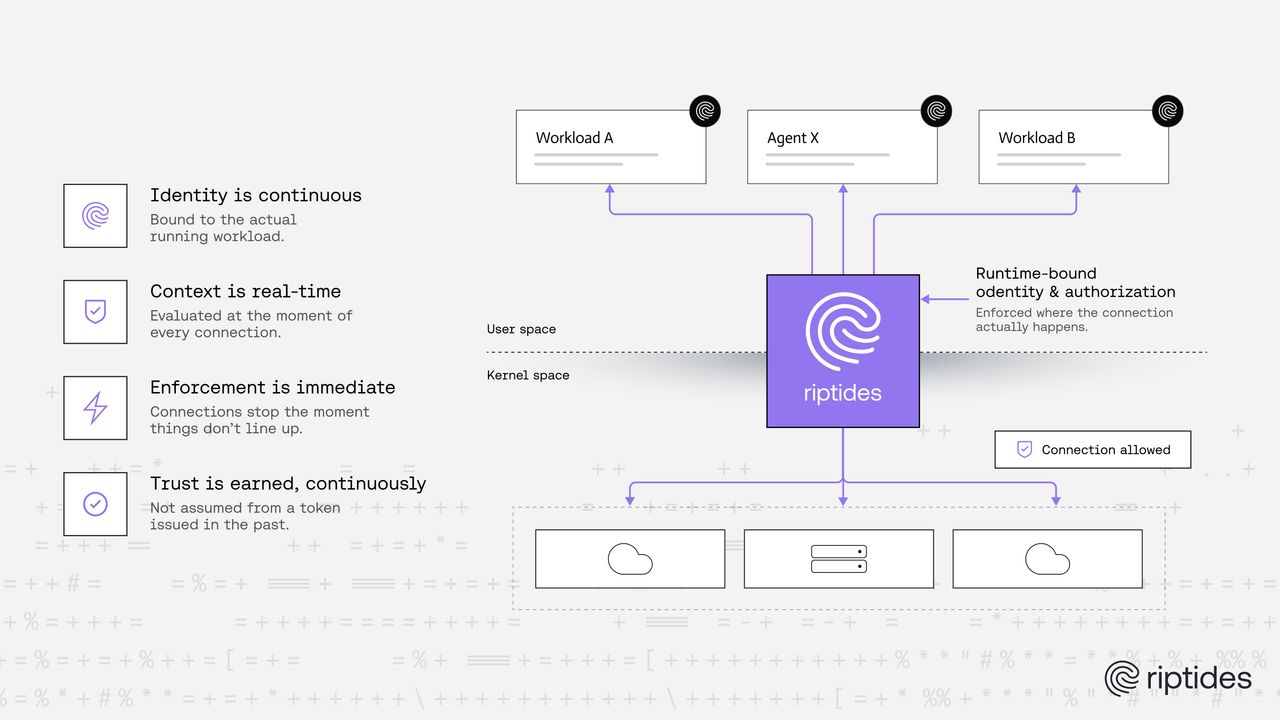
“Mutual TLS with no changes to the application” is the kind of claim that sounds like it has a catch. Usually it does. There’s a sidecar to schedule, an SDK to link, a proxy variable to set, a trust store to edit. The claim survives the slide deck and then quietly dies in the proof of concept.
So instead of describing it again, we published the demo we normally give in person:
https://github.com/riptideslabs/core-demo
It runs on one Linux machine and takes about fifteen minutes.
What it shows
Four short acts. Each one prints its own evidence, so you don’t have to take our word for any of it.
- Augmentation. Where a workload’s identity comes from: the labels the daemon collects from a running process, before any policy exists. The kernel is already tracing both connections at that point, in the clear, with no identity on them.
- mTLS between two internal services. One HTTP leg, one Redis leg. You count the packets carrying the payload, apply the policy, then run the same capture command again. The count drops to zero while the traffic volume doesn’t, so nobody can wave away “no hits” as “no traffic”. Then you revoke it with a policy edit and watch the connection reset.
- Passthrough. This is the answer to the objection we hear most often: “we already do our own TLS.” Redis gets switched over to serving TLS itself. Riptides authenticates both ends and then steps out of the data path, so you get authorization without decryption. The policy doesn’t change at all. The behaviour changes on its own.
- Credential injection on egress. A GitHub token that reaches the API but is
never in the workload, its environment or its image.
curl -vshows that the request curl wrote had noAuthorizationheader on it. The header went on after the bytes left the process.
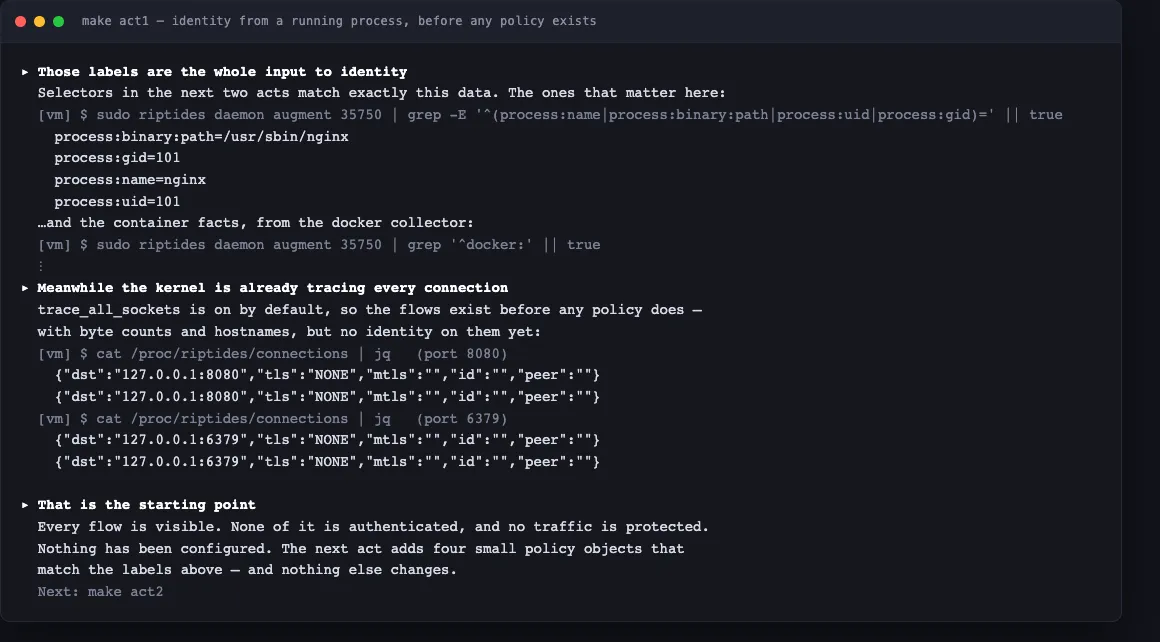
Act 1, before any policy exists. Those labels are the whole input to identity.
The connections below them are already traced: tls: NONE, no SPIFFE ID.
Why the containers matter
The application is five unmodified upstream containers: nginx, go-httpbin, redis
and curl, pulled as-is. They speak plaintext and hold no keys, certificates or
tokens. Everything the demo shows gets added underneath them, in a Linux kernel
module. That’s what makes “no changes to the application” something you can
check rather than something you have to believe. At the end of act 2, nginx
still says proxy_pass http://….
Policy is written the way a customer writes it, as CRDs applied against a real control plane. There’s no developer-only shortcut anywhere in it, so what you run is what ships.
Why four small steps and not one
Most capability demos show the end state: everything switched on, everything working. That tells you the whole bundle works on the presenter’s laptop. It doesn’t tell you which part did which job, and it leaves you with nothing to work from when one part misbehaves in your environment.
So each act changes exactly one thing, and shows the same measurement on both sides of that change.
Act 1 is mostly there to establish the “before”: traffic in the clear, no
identity, no policy. Without it you can’t tell whether act 2 encrypted something
or whether it was already encrypted when you walked in. Act 2 applies the policy
and runs the same capture command, verbatim. The packets carrying GET /get go
from 4 of 8 to 0 of 18, and on the Redis leg demo:ts goes from 4 of 12 to 0 of
29. There are more packets than before, and none of them carry the payload. A
count that moves while the volume holds is a measurement. A screenshot with a
green checkmark on it isn’t.
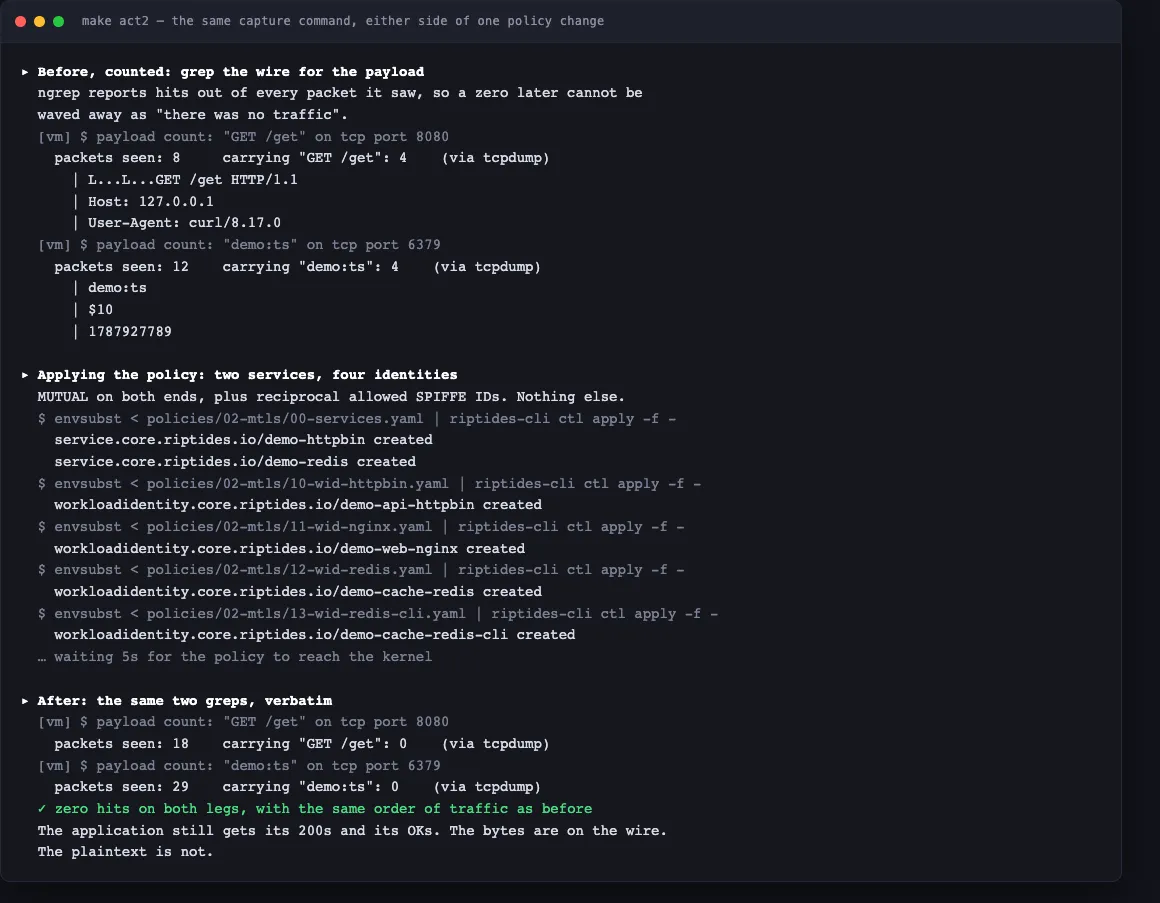
Two counts, five policy objects, then the same two counts again. Nothing else changed in between.
Each act shows the negative case too. Drop a workload from the allow-list and the connection resets within one reconnect. Put it back and it recovers. If everything in a demo succeeds, you learn nothing about how to diagnose it later, and you can’t tell which parts are actually doing the work.
It also guards against the most common way a demo lies, which is a zero that
looks like proof. “No hits” can mean encrypted. It can also mean no traffic, a
missing capture tool, or a policy that never applied. So every step is built to
make a false success obvious. When the capture tool isn’t there, the script says
NO PACKETS SEEN instead of printing a comfortable zero.
There’s a practical side to this as well. You can stop at whichever act covers the claim you actually doubt and dig into that one, instead of taking the whole thing as a package deal.
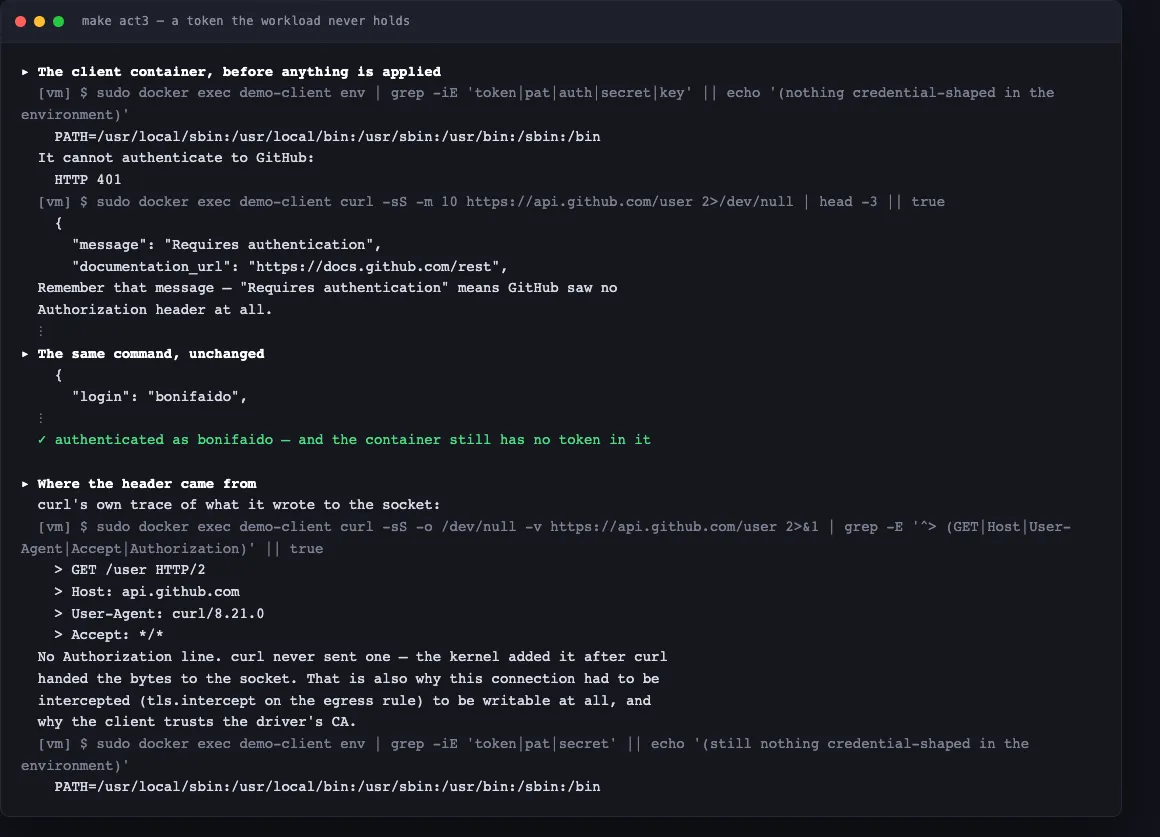
Act 3. The response changes, and curl -v shows what curl actually wrote, with
no Authorization line in it.
Where it runs
On a VM on your laptop, or on AWS. We’ve verified both, and any Linux box you can SSH into will behave the same way. You need a control plane, which is free at console.riptides.io, plus a node joined to it. The README covers both paths.
First of a series
The demo is deliberately synthetic. Redis setting a timestamp key in a loop isn’t anybody’s production workload. It’s just a clean way to watch one mechanism at a time, without a real system’s noise on top of it.
That’s where we wanted to start. The next posts will work through the rest of the capabilities the same way, one at a time and with something you can run, and move from synthetic setups toward what real deployments look like: Kubernetes, CI runners, multiple clusters, egress to third-party APIs.
The AI features come later in the series on purpose. Session-level attribution across an agent’s model calls, MCP requests and database queries, and tokens an agent can use but never read, aren’t a separate product bolted on the side. They’re what you get once the identity in this demo is in place, and that’s much easier to explain after you’ve watched the ordinary part work on your own machine.
If something doesn’t behave the way the README says it should, open an issue. Questions are welcome too.
How exposed are your workloads?
Run the NHI Security Audit Checklist, 8 questions to map your credential exposure, attribution gaps, and lateral movement surface across your own environment. Takes about 15 minutes.
Run the ChecklistFollow us on LinkedIn and X for more updates.