Introducing KeyLedger: Because You Probably Don’t Know How Many AI Keys Your Org Has
Try this thought experiment. Open every AI provider dashboard your organization uses. Count the keys.
OpenAI: a handful of active keys scattered across several projects. Anthropic: a dozen or more across a few workspaces. Google Cloud: service accounts with IAM keys for Vertex AI that nobody’s audited in months. AWS Bedrock: access keys attached to IAM users whose owners you’d have to look up.
You’ll find dozens of credentials, issued by multiple providers, managed through multiple dashboards, with different API shapes and different definitions of what metadata to expose. Now ask yourself: is one of those OpenAI keys over a year old and never been used? Is there an Anthropic key in the default workspace, created by someone who left the company two quarters ago? Has an AWS access key gone unrotated since before your last performance review?
In most organizations, the answer to all three is yes. Nobody notices, because there’s no single place to look.
That’s why we built KeyLedger, and we’re open-sourcing it today.
What KeyLedger Does
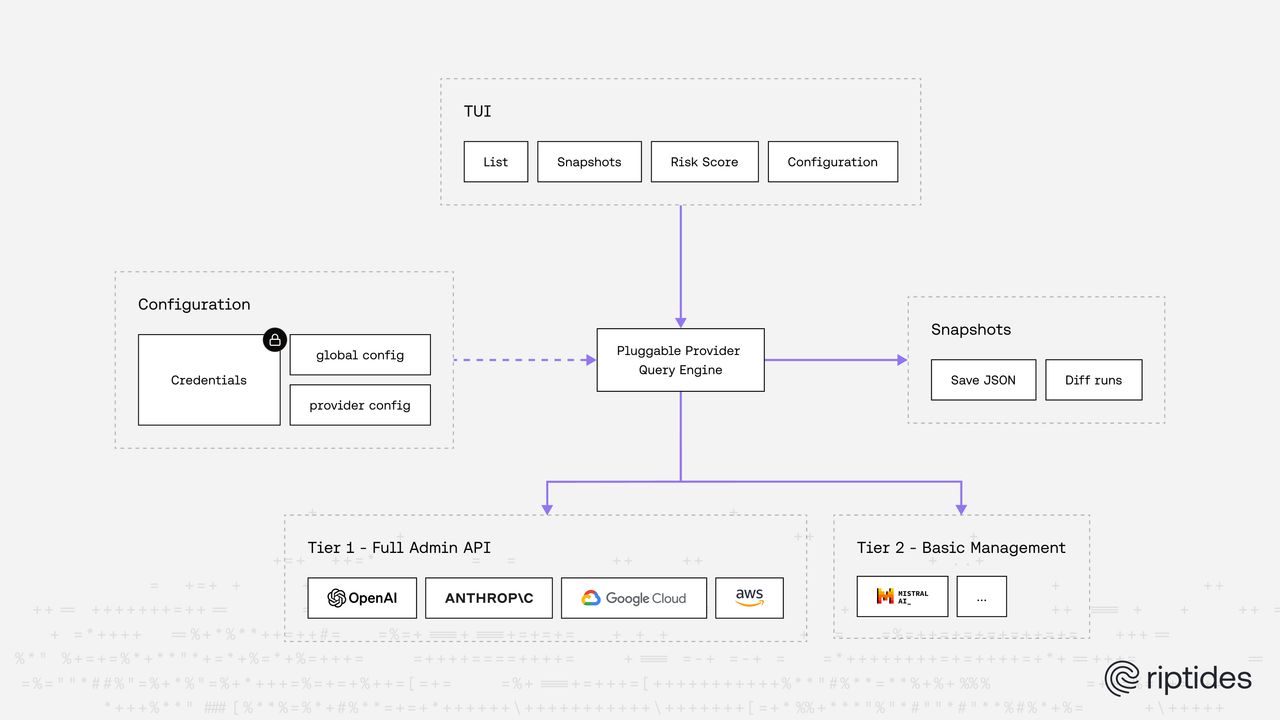
KeyLedger is a Go TUI tool that connects to AI provider admin APIs and gives you a unified inventory of every API key issued across your organization. One command, all providers, one table.

No database server. No background process. No infrastructure. One binary.
What You Get Out of the Box
KeyLedger ships with six capabilities designed to fit how infrastructure teams actually work, from interactive exploration to fully automated CI pipelines.
Interactive TUI. A full-screen terminal dashboard built with Bubble Tea. Browse, filter, and sort keys across every provider from one place. If you’ve used k9s for Kubernetes or lazygit for git, you know the workflow. KeyLedger brings the same experience to AI key management. No browser required.
Health scoring. Every key gets an automatic risk score based on configurable thresholds. Keys older than 90 days get flagged as stale. Keys unused for 30 days get flagged as idle. Keys that were created and never used at all get flagged as critical. You configure the thresholds; KeyLedger does the math across every provider in every workspace and project.
Snapshots and diffs. KeyLedger stores point-in-time snapshots in a local SQLite database. Diff any two snapshots — or a snapshot against the current live inventory — to see exactly what changed: new keys issued, keys revoked, status changes, scope changes. This gives you rotation history that no provider dashboard offers natively, since their APIs only return the current state.
Watch mode. The interactive TUI is great at a terminal, but pipelines need non-interactive commands. KeyLedger ships with watch as standalone CLI commands. The watch mode runs continuously, polling providers on a schedule and alerting when things change.
Encrypted credential storage. The admin keys you configure (your OpenAI admin key, your Anthropic admin key) are stored in an AES-256-GCM encrypted SQLite database, unlocked with a password at the start of each session. No OS keyring dependency, no plaintext config files with credentials sitting on disk. The encryption is handled by KeyLedger itself, one less external dependency to manage.
Docker-ready. A pre-built Docker image runs KeyLedger in watch mode with a built-in unseal API, so credentials can be supplied at runtime without a terminal. This makes it straightforward to deploy as a long-running service in Kubernetes or Docker Compose, polling your providers continuously and exposing health status.
Why AI Key Hygiene Matters Now
If you’re running AI agents in production — and at this point, most of us are — your API key surface area has grown faster than your processes to manage it. Here’s why that’s a problem:
Financial exposure. An OpenAI key with no spend limits can rack up tens of thousands of dollars overnight if it lands in the wrong hands. Unlike a leaked database password that requires further exploitation, a leaked LLM API key is immediately monetizable. Copy, paste, run inference. That’s it.
Key sprawl is accelerating. Every new agent, every new environment, every PoC, every integration spins up new keys. Developers create them in the provider’s dashboard, drop them in an .env file, and move on. Six months later nobody remembers they exist. The key is still active, still has full permissions, and probably still sitting in someone’s shell history.
Rotation isn’t happening. Be honest: when was the last time you rotated your AI provider keys? Most teams treat them as set-and-forget. Meanwhile, the compliance frameworks you’re bound to (SOC 2, ISO 27001, PCI DSS) all require key rotation policies. You can’t enforce a rotation policy if you don’t have an inventory.
No unified visibility exists. Every provider has its own dashboard. OpenAI organizes keys by projects. Anthropic uses workspaces. Google Cloud nests them under service accounts inside projects. AWS ties them to IAM users. If you want to answer “how many active AI keys do we have?” you’re clicking through 4+ dashboards and correlating manually.
That last point is the one that really drove this project. The open source ecosystem has excellent tools for finding leaked secrets — TruffleHog, Gitleaks, Betterleaks — but nothing that answers the other half of the question: “what keys are legitimately issued?” We looked. Extensively. It doesn’t exist. AI gateways like LiteLLM route requests but don’t query provider admin APIs. Secret managers store credentials but can’t inventory what a third party has issued. The provider inventory side is a gap.
KeyLedger fills it.
Provider Breakdown
Tier 1: Full Admin API Coverage
These are the providers where we can give you the richest picture, because they expose comprehensive admin APIs with key listing, owner information, and (in some cases) usage tracking.
OpenAI
OpenAI organizes keys in a two-level hierarchy: Organization → Projects → Keys, with admin keys living at the org level.
KeyLedger enumerates all projects in your organization (via GET /v1/organization/projects with pagination), then queries keys within each project, plus org-level admin keys separately. The metadata you get back is the most complete of any provider we support:
- Key ID and name — the identifier and human-readable label
- Created timestamp — when the key was issued
- Last used timestamp — when the key was last used (this is big — most providers don’t expose this)
- Owner — full name, email, role, and whether it’s a user or service account
- Redacted key value — partial hint for identification
- Project — which project the key belongs to
The last_used_at field is genuinely valuable. Combined with created_at, it lets KeyLedger flag keys that were created but never used, or keys that have gone idle — both of which are rotation candidates or revocation targets.
A note on reliability (a telling one): OpenAI exposes two separate listing endpoints — one for project-scoped API keys and one for org-level admin API keys. During development we hit persistent 404s on the admin keys endpoint. It was just broken. So we opened a thread on the OpenAI community forum, and OpenAI support eventually confirmed and fixed it. But here’s the part that stuck with us: once the thread was live, other users started chiming in — “same here,” “also getting 404s,” “oh, it works now.” The endpoint had been failing intermittently, and nobody had reported it. In a world where we talk endlessly about AI security, the endpoint that lets you list your own admin keys was quietly returning 404s and nobody had noticed, because nobody was calling it. If that doesn’t tell you something about how few organizations are actually tracking their AI credentials, we don’t know what does. KeyLedger handles this with retry logic and graceful degradation: if the admin keys endpoint returns 404, the project-level inventory still completes and a warning is logged.
Anthropic
Anthropic organizes keys under Organization → Workspaces → Keys. Keys in the default workspace have a null workspace_id.
KeyLedger queries the Anthropic admin API without a workspace filter to get keys across all workspaces in a single call. It then makes secondary calls to resolve workspace names (from GET /v1/organizations/workspaces) and user names and emails (from GET /v1/organizations/users, since the keys API only returns user IDs in the created_by field).
What you get:
- Key ID, name, and partial hint
- Created timestamp
- Status — active, inactive, or archived
- Created by — user ID (resolved to name/email via secondary call)
- Workspace — which workspace the key belongs to
Notable limitation: Anthropic does not expose a last_used_at field.
KeyLedger fetches a 30-day usage report (/v1/organizations/usage_report/messages) and matches usage to keys by ID.
Keys with no usage in the past 30 days show ‘>31 days ago’ as the Last Used value, since the usage window only covers 31 days of history — the exact last-used date beyond that window is not retrievable.
This usage-report workaround gives you some signal — you can tell whether a key was used in the last 30 days — but it has real gaps: you can’t tell the exact last-used date for keys idle longer than a month, and the matching relies on key IDs appearing in usage records, which can miss edge cases.
A native last_used_at field on the keys API would eliminate all of this.
If you’re an Anthropic PM reading this — please consider adding per-key usage timestamps to your admin API. It’s a small change on your end and would make idle-key detection dramatically more reliable.
Google Cloud (Vertex AI / Gemini)
Google Cloud has the deepest hierarchy of any provider: Organization → Projects → Service Accounts → Keys. A single GCP organization can have dozens of projects, each with multiple service accounts, each with multiple keys.
KeyLedger enumerates all projects accessible to the service account you configure, then discovers all service accounts within each project, then lists keys per service account. This three-level traversal ensures nothing is missed.
What you get:
- Key ID and algorithm
- Key origin — whether the key was created by GCP or user-provided
- Key type — user-managed vs. system-managed
- Valid after / valid before — the key’s validity window
- Disabled status
- Project and service account — the full path in the hierarchy
By default, KeyLedger filters out GCP-managed keys (which GCP auto-creates and rotates for service accounts), since they’re typically noise. You can include them via config if you need a complete picture.
Notable limitation: No last_used_at in the keys API. Google offers this data separately through the IAM Activity Analyzer, which we plan to integrate in a future release.
AWS (Bedrock / IAM)
AWS doesn’t organize keys by project or workspace — it ties them to IAM Users. Every IAM user can have up to two access keys.
KeyLedger calls ListUsers to enumerate all IAM users in the account, then ListAccessKeys for each user, then GetAccessKeyLastUsed for each key. This gives you the most complete usage picture of any provider:
- Access Key ID
- IAM user — who owns the key
- Created timestamp
- Status — active or inactive
- Last used timestamp — when the key was last used
- Last used service — which AWS service was called (e.g.,
bedrock,s3) - Last used region — from where
The last_used_service field is uniquely valuable — it tells you not just when a key was used but what for. A key that last called S3 two years ago probably isn’t being used for Bedrock.
Tier 2: Work in Progress
We’ve built provider stubs for Mistral, Cohere, Pinecone, Groq, Together AI, Fireworks AI, ElevenLabs, DeepSeek, and Replicate. The honest reality is that almost none of them have a management API that supports programmatic key listing today.
We’re in active conversations with Mistral, where there’s a real possibility of proper admin API support. For the rest, key management is dashboard-only — you log into the web console, and that’s your inventory tool.
Mistral is now working with the help of session tokens. Please check the documentation.
We’re keeping these in the codebase because the landscape is evolving quickly. As these providers mature and introduce admin APIs (and we believe they will, as enterprise adoption demands it), we’ll be ready to integrate. If you have contacts at any of these providers or know of undocumented APIs, we’d love to hear from you.
In the meantime, KeyLedger’s pluggable architecture means you can write a provider in under 100 lines of Go.
Riptides: Where KeyLedger Meets Zero-Trust Key Management
KeyLedger is open source and always will be. It’s a read-only audit tool — it tells you what keys exist, flags what’s stale, and diffs what changed. It does not manage, rotate, or deliver keys.
For teams that need the full lifecycle — not just visibility, but credential protection, rotation, and enforcement — Riptides is our commercial platform, and KeyLedger is embedded in it.
KeyLedger Runs Automatically Inside Riptides
With Riptides, provider enumeration runs automatically and continuously for every customer. The Riptides control plane polls your AI provider admin APIs on a schedule, tracks key inventories over time, diffs snapshots, and alerts when something changes — a new key appears, an old key goes stale, a key gets revoked. You don’t run a CLI; it’s already running.
The admin credentials needed to query provider APIs (your OpenAI admin key, your Anthropic admin key, your GCP service account) are sourced from configurable secure backends — HashiCorp Vault, Kubernetes Secrets, AWS Secrets Manager, or the Riptides native credential store. From the control plane, you can rotate, revoke, and set rotation schedules for every provider credential, with full audit logging and policy enforcement.
Credentials Never Meet User Space
Here’s the part that changes the security model fundamentally. Riptides deploys as a kernel module — not a sidecar, not a proxy, not an SDK. When your AI agent makes an outbound API call to OpenAI, Anthropic, or any other provider, the Riptides kernel module intercepts the request, matches the agent’s SPIFFE identity to a credential binding, and injects the API key into the request on the wire, in kernel space.
The credential never enters process memory. There’s no .env file, no config variable, no Authorization header your code constructs. The key exists only in kernel memory, only for the duration of that specific request, only for the process that was authorized by policy to use it, and with the shortest possible lifespan. From the developer’s perspective nothing changes — the API call works as if the key were configured normally — but from a security perspective, there’s nothing to leak because the credential never touches user space.
This is how Riptides handles all credential types — AI provider API keys, SigV4 signatures, bearer tokens, mTLS certificates — and it works with any agent framework (LangChain, CrewAI, OpenAI Agents SDK, MCP-based agents), any language, any runtime. No code changes required. Agents cannot bypass, disable, or route around it.
Active Key Scanning and Lateral Movement Prevention
Visibility into what’s issued is only half the picture. Riptides also actively scans for exposed AI provider keys across the places they shouldn’t be:
- Code repositories — full git history scanning, not just the current tree, including every commit, branch, and stash
- GitHub organizations — org-wide scanning across all repos
- File systems —
.envfiles, config files, dotfiles, shell histories, IDE configs - Environment variables — runtime inspection of deployed environments
- Communication channels — Slack messages, where developers routinely paste keys during debugging
This scanning layer is critical for preventing lateral movement. If an attacker compromises a developer workstation, one of the first things they look for is API keys — in shell history, config files, browser storage, and Slack. Leaked AI keys aren’t just a billing risk; they’re a pivot point for broader access if the key’s provider account connects to other systems.
Riptides cross-references what the scanners find against what KeyLedger’s provider inventory reports. The result: you know not just that a key leaked, but whether it’s still active, who issued it, which workspace it belongs to, and whether it should be auto-revoked. And because Riptides injects credentials at the kernel rather than exposing them to applications, the attack surface for future leaks collapses — there are no keys in user space to find.
Getting Started
# Install
go install github.com/riptideslabs/keyledger/cmd/keyledger@latest

# Run
keyledger
Full configuration options, provider setup guides, and the JSON config reference are in the project README and documentation.
What’s Next and How You Can Help
KeyLedger is at v0.1. It does what it says — lists keys across providers, scores their health, diffs between runs — and it does it well. But there’s a lot more we want to build:
- Tier 2 provider support as their admin APIs mature
- OAuth grant auditing — querying GitHub, Slack, and Google for third-party app authorizations granted to AI platforms (the “deposited keys” problem)
- Cost attribution — linking keys to usage spend where providers expose billing APIs
- RBAC auditing — showing what permissions each key has, not just that it exists
- Webhook notifications — automated alerts when critical changes are detected between snapshots
We built KeyLedger because we needed it. If you’re managing AI infrastructure at any scale, you probably need something like it too. We’d rather build it together.
Try it, break it, tell us what’s missing. Open an issue, submit a PR, or just star the repo if the problem resonates with you.
https://github.com/riptideslabs/keyledger
KeyLedger is maintained by the team at Riptides. KeyLedger is MIT licensed and free forever.
How exposed are your workloads?
Run the NHI Security Audit Checklist, 8 questions to map your credential exposure, attribution gaps, and lateral movement surface across your own environment. Takes about 15 minutes.
Run the ChecklistFollow us on LinkedIn and X for more updates.