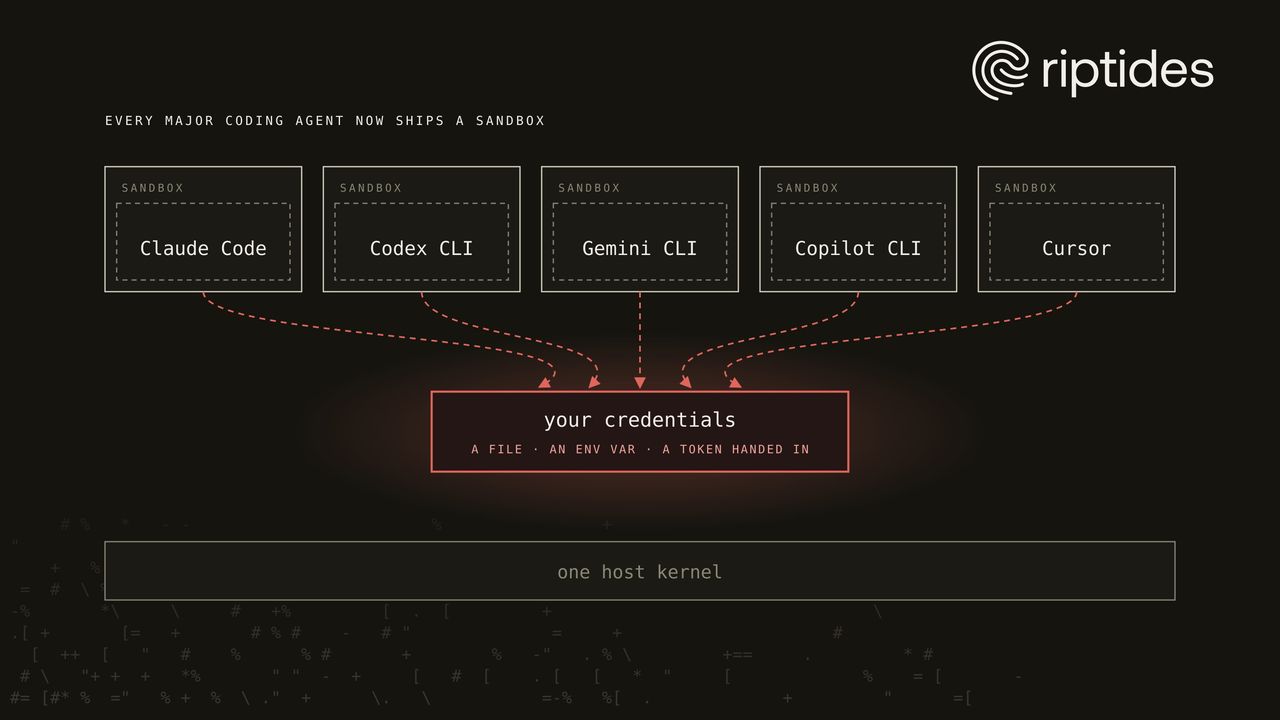
Every major AI coding agent now ships a sandbox for the commands it runs: Claude Code, OpenAI’s Codex CLI, Gemini CLI, GitHub Copilot CLI and Cursor. The last two arrived recently. Cursor turned its sandbox on by default in October 2025, and GitHub put Copilot’s local sandbox into public preview in June 2026, then brought it to the Copilot app in September.
That’s real progress, so we put them to the test. We ran the same checks inside Claude Code’s sandbox runtime, Codex and Copilot, the last two on Windows too, and checked the rest against each vendor’s docs.
The short version: these sandboxes are serious about writes, and very different about the network. But in every one of them, the agent’s credentials still reach the commands it runs, as a readable file, an inherited environment variable, or a token the agent hands in on purpose. And a command that can read a secret can leak it, sandbox or not. Credentials are only the sharpest example: the same read rules cover every document on the machine.
Everything here is as of September 30, 2026. The comparison covers Linux and macOS, with Windows tests of Codex and Copilot at the end of the measurements. These products change monthly, so check the version you run.
The five sandboxes at a glance
| Claude Code | Codex CLI | Gemini CLI | Copilot CLI | Cursor | |
|---|---|---|---|---|---|
| On by default | No | Yes | No | No (preview) | Yes |
| Linux / macOS | bubblewrap / Seatbelt | bubblewrap + seccomp / Seatbelt | Docker, Podman or gVisor / Seatbelt | bubblewrap / Seatbelt | Landlock + seccomp / Seatbelt |
| Sandboxed | Shell commands | Shell commands, file patches | The whole CLI | Commands, local MCP servers | Shell commands |
| Reads by default | Whole machine | Whole disk | Whole machine (default macOS profile) | Specific grants; ~/.ssh and gh credentials blocked | Most of it; ~/.ssh “always readable” |
| Network by default | None until approved, then by hostname | Off; on means fully open | Open | Open | Allowlist plus ~100 package-registry domains |
| Environment | Inherited | Inherited, *TOKEN* included | Inherited (macOS) or allowlist (containers) | Inherited, minus a blocklist | Inherited |
| Credentials | Opt-in masking via proxy (experimental) | None documented | None | Exports GH_TOKEN to commands | None locally |
| MCP servers | Outside the sandbox | Outside the sandbox | Inside, with the whole CLI | Local ones inside | Outside; approvals or a classifier |
Sources are linked in the sections below.
The MCP row deserves a second look. In three of the five agents, MCP servers run outside the sandbox with your full user rights, so every MCP server you install is part of what you trust, however tight the sandbox around the agent’s commands. We looked at what that means for authority and shared credentials in Our AI Is Helpful. Also Slightly Overprivileged.
Agent by agent
Claude Code. The sandbox is opt-in (/sandbox). Writes are confined to the project, and sensitive paths such as .git/hooks stay protected even there. Network traffic goes through a proxy outside the sandbox that allows hosts one by one. Reads are open by default. It’s the one agent with its own credential masking: sandboxed commands see a placeholder and the proxy swaps in the real value, which requires the proxy to terminate TLS, a setting the docs mark experimental. Stricter settings are a configuration away: denying reads outside the project, a strict network allowlist, credential deny and mask rules, no unsandboxed retries, and managed settings that let an organization enforce and lock all of it.
Codex CLI. On by default. Interactive sessions can write only to the workspace, and the network is off until you turn it on, the most restrictive network default of the five. Turning it on opens everything, unless you enable the experimental per-domain proxy. Reads cover the whole disk, and the default environment policy passes variables named *KEY*, *SECRET* and *TOKEN* through to commands. The source contains a credential broker in the network proxy, but it isn’t documented.
Gemini CLI. Off by default. When on, it relaunches the whole CLI inside the sandbox rather than wrapping single commands. The default macOS profile, permissive-open, allows reads everywhere, including ~/.ssh, ~/.aws and ~/.config/gcloud, and leaves the network open. Container mode mounts only the project read-write, but mounts your gcloud credentials read-only. Environment redaction exists and defaults to off, although parts of the docs say it’s automatic.
GitHub Copilot CLI. Off by default and behind the experimental flag, built on Microsoft’s MXC layer, whose own README says no profile “should be treated as security boundaries currently”. Its filesystem policy is the most careful of the five: access is denied unless granted, and ~/.ssh, the keychain and gh’s stored credentials are blocked. But it exports GH_TOKEN to commands so gh works, leaves outbound network open by default, and lets you bypass a block with one prompt.
Cursor. On by default since 2.0 on macOS, and on Linux since December 2025. Its sandbox reference states that “~/.ssh is always readable”. The default network mode allows your list plus about a hundred package-registry domains, github.com among them. Secret redaction exists only for Cursor’s cloud agents, and its enterprise docs are candid: “There is no security boundary between agents and your user account.”
What we measured
We ran one script inside three of the sandboxes on an Ubuntu 26.04 VM: Anthropic’s sandbox-runtime 0.0.78, which Claude Code’s docs name as the same primitives as its sandbox (with its Unix-socket filter off, which Ubuntu 26.04’s user-namespace restriction wouldn’t let start and which none of these checks depend on); Codex CLI 0.144.6 through codex sandbox; and Copilot CLI 1.0.89 with its sandbox enabled on the default policy, driven through the agent itself. The script never prints a secret, only whether it can reach one.
| Check | No sandbox | Claude’s runtime (allowlist: api.github.com) | Codex, workspace-write | Codex, workspace-write + network | Copilot, network off |
|---|---|---|---|---|---|
Read the GitHub token file (~/.config/gh/hosts.yml) | Yes | Yes | Yes | Yes | No |
List ~/.ssh | Yes | Yes | Yes | Yes | No |
See a *_TOKEN variable from the parent | Yes | Yes | Yes | Yes | Yes |
| Write outside the project | Yes | No | No | No | No (a throwaway home) |
Reach api.github.com | Yes | Yes | No | Yes | No |
Reach example.com | Yes | No | No | Yes | No |
| Process owning the connection | curl | the proxy (node) | none | curl | none |
All three did what their documentation promises. Copilot’s was the only one to keep the token file and ~/.ssh out of reach, and it hid ~/.aws/credentials and Copilot’s own token file as well: inside its sandbox they simply don’t exist, and the home directory is a throwaway in-memory copy. But for a command that runs gh, it injects a GH_TOKEN into that command’s environment, as its documentation says, and the parent’s other variables come through too. It also defuses git through the environment, emptying git’s credential helper and turning off core.fsmonitor and bare-repository discovery, which is the path one of Copilot’s own CVEs took.
Copilot’s default policy allows outbound network, but on our Ubuntu 26.04 host its sandbox couldn’t create its network namespace and refused to start, so we measured it with outbound network off. Failing closed was the right call. When we asked the agent to show whether the injected GH_TOKEN was the real token, even as a truncated hash, Copilot’s model declined. That’s a useful guardrail, but it’s the model’s judgment, not a boundary.
The last row matters for anyone attributing traffic to processes. Claude’s sandbox sends everything through its own proxy, so to the operating system every sandboxed connection comes from that proxy, not from the command that asked for it. It’s the identity problem we described in SPIFFE Is What AI Agents Need for Identity: whoever terminates the connection is who the other side sees.
Where that GitHub token lives depends on the machine. gh keeps it in the operating system’s keyring when there is one, and falls back to plain text in ~/.config/gh/hosts.yml when there isn’t, which is the usual case on a headless Linux VM, a container or a server, and was the case on ours. Plain-text tokens like that are exactly what worms such as Shai-Hulud sweep for. Git stores nothing itself; it asks a credential helper, which here is gh, and with the common store helper is plain text in ~/.git-credentials. On a Mac the token usually sits in the Keychain, out of reach of cat but not of a sandboxed gh auth token, unless the sandbox blocks Keychain access, as Copilot’s does by default. Copilot CLI keeps its own token the same way: with no keyring, it asks, then writes it to a plain-text file.
And on Windows
We ran the same checks against Codex CLI 0.159.2 on a GitHub-hosted Windows Server 2025 runner, in both of Codex’s Windows sandbox modes, and tried Copilot on Windows 11 and Windows Server. The scripts, workflow and raw results are public in agent-sandbox-lab, so you can rerun them.
| Check | Codex, elevated | Codex, unelevated |
|---|---|---|
| Runs as | A separate sandbox user | Your user, with a restricted token |
Read the gh token file in your %APPDATA% | Yes | Yes |
List your %USERPROFILE%\.ssh | No | Yes |
| Read your Credential Manager entry | No | Yes |
See a *_TOKEN variable from the parent | Yes | Yes |
| Write outside the project | No | No |
| Network off | Off, enforced by the firewall | Bypassable |
Elevated mode gave the strongest credential isolation we measured anywhere: running commands as a separate Windows user kept them out of .ssh and Credential Manager. The token file and the environment variable still got through.
Unelevated mode’s “network off” turned out to be proxy variables pointing at a dead local proxy. Node ignores those, and reached api.github.com with the network supposedly off. Codex’s documentation does call these “weaker env-level offline controls”; this is what that means in practice. With network on, in both modes, HTTPS from Windows’ own TLS stack (curl.exe, for one) failed inside the sandbox, while node’s worked.
We tried Copilot CLI 1.0.89 on Windows as well, with its sandbox enabled, and it didn’t get as far as the checks. On Windows 11 25H2 with the September update, it refused to run anything, even a plain cmd.exe command: “This Windows host cannot run PowerShell in the sandbox.” On Windows Server 2025 it went the other way. It printed a warning, “Sandboxing is disabled for this session because this host does not support it. Shell commands and sandboxed services will run unsandboxed”, and then ran every command with full access, although sandbox.enabled was set. Its own help says commands should fail in that case, as they did for us on Linux. If you rely on Copilot’s sandbox on Windows, watch for that warning.
These ran on GitHub-hosted CI runners as an administrator, which is not a developer’s laptop, so treat them as indicative.
A sandboxed read is enough
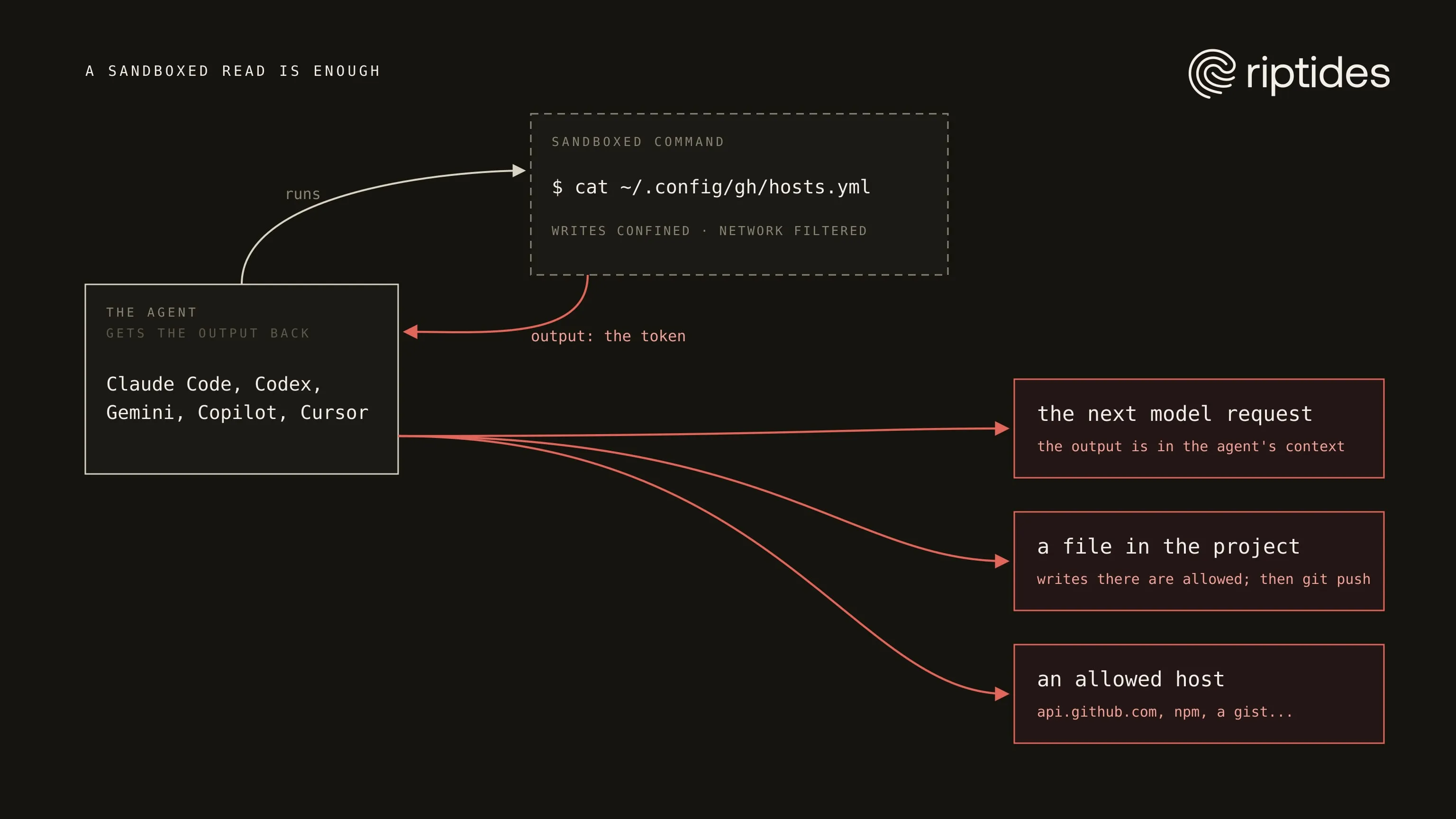
It’s tempting to think a command that can’t write outside the project or reach arbitrary hosts can’t do much with a secret it reads. But the output of a sandboxed command goes straight back to the agent, which in four of the five runs outside the sandbox. Gemini’s runs inside it, which changes little: its model requests still leave. From there, a prompt-injected agent has three easy ways out: the next request to its model, a file in the project where writes are allowed, and whatever hosts the sandbox allows, which in Cursor’s defaults includes github.com and in Copilot’s and Gemini’s defaults is everything. Attackers know where to look: Miasma planted credential stealers aimed at AI coding tools, Claude Code and Gemini CLI among them.
The sandbox that goes furthest in blocking secret files, Copilot’s, hands commands a GitHub token through the environment instead, because gh has to work. That’s the underlying tension: the agent needs credentials to do its job, and every design so far either exposes them to the commands or deliberately passes them in.
It isn’t only credentials
The read rules don’t tell a token file from a contract, a customer export, another client’s repository or a classified document. Four of the five sandboxes let commands read most or all of the machine by default. Only Copilot’s limits reads to the project and a short list of tool paths: in our test, a document in ~/Documents and a note in the home directory didn’t exist inside its sandbox.
For documents the risk doesn’t even need an attacker. Whatever a command reads goes back into the agent’s context, and the agent sends its context to its model provider; that’s how it works. An agent that searches your home directory while debugging something unrelated has already sent what it found to a third party. For regulated, export-controlled or classified data, that transmission is the incident, with no malice and no exfiltration involved.
If you work with that kind of data, keep it off any machine where an agent with a hosted model runs, or make sure the agent can’t see it: a sandbox that denies reads outside the project, or better, a VM that only has the project to begin with.
Most of them share your kernel
Apart from Gemini CLI’s container and gVisor modes, which add a VM on a Mac or a user-space kernel, these are process sandboxes on your own kernel, and the past year has brought a steady stream of escapes and bypasses. Cursor fixed a batch in 3.0, including DuneSlide, a zero-click escape through prompt injection rated 9.8. Codex fixed a model-controlled writable root and a safe-listed git command that led to code execution. Gemini CLI fixed a critical headless-mode RCE that got around its trust and allowlist checks. And a single Docker socket reachable from inside the sandbox let researchers escape Codex, Cursor and Gemini CLI alike.
None of this means the sandboxes are bad. It means they are perimeters, and as we argued in When the Sandbox Fails, the Kernel Shouldn’t, perimeters get bypassed. The question is what the agent has once they do.
Closing the gap
Two things are missing from every built-in sandbox, and neither can be added from inside the agent:
- A boundary with its own kernel. Run the agent in a VM, so an escape lands in a machine that holds nothing of yours. We showed that setup with Copilot in Lima.
- Credentials the agent never holds. Inject them into the connection instead of handing them to the process. That’s what Riptides does from the kernel, for every process and every agent, and it’s the approach behind Your Coding Agent Should Never Hold a Token.
The vendors are circling the same idea. Claude Code masks credentials through its proxy, Copilot injects a GitHub token for git, and Codex has a credential broker in its source. Each does it inside its own agent, in user space, for that agent only, and Copilot’s version passes the token to the command rather than keeping it away.
What to do today
- Turn your agent’s sandbox on. Claude Code, Gemini CLI and Copilot ship with it off.
- Deny reads outside the project, not only of credential paths:
denyReadon your home directory with anallowReadfor the project, orsandbox.credentials, in Claude Code; deny-read rules in Codex’s permission profiles, up to denying:root; container mode in Gemini CLI, which mounts the project but not your home directory (your gcloud credentials still go in, read-only). Copilot’s default already limits reads. - Keep tokens out of the environment and out of plain-text files. Check what your agent passes through, run
gh auth statusto see whether your token is in the keyring or inhosts.yml, and avoid git’sstorehelper. - Give the agent a machine of its own and credentials it can’t read: a VM for the boundary, and injection for the secrets.
To try the credential part: Start Free or Talk to us.
How exposed are your workloads?
Run the NHI Security Audit Checklist, 8 questions to map your credential exposure, attribution gaps, and lateral movement surface across your own environment. Takes about 15 minutes.
Run the ChecklistFollow us on LinkedIn and X for more updates.